





The West African Examinations Council (WAEC) is an examination body created to decide which exams are necessary for the public interest in the English-speaking nations of West Africa.
For the 2025 WASSCE (West African Senior School Certificate Examination), which was held between Thursday, April 24, and Friday, June 20, 2025, a total of 1,973,253 candidates were registered from 23,554 schools. This includes 979,228 males and 994,025 females.
Recall that the examination board recently disregarded circulating reports that the recently concluded examination had been cancelled.
According to the board, a false statement circulated on social media platforms on Saturday, July 19, that both the Federal Ministry of Education, in collaboration with WAEC, had cancelled the examination due to widespread examination malpractice, leakage of question papers, and unauthorised digital dissemination of exam materials.
“The WAEC Management would like to state unequivocally that the spurious Press Statement being circulated did not emanate from the Council. The said examination has not been cancelled,” the board said.
Before proceeding to check your result, you need a working device with access to a good network connection, WAEC result checker e-PIN, serial number and your 10-digit examination number.
Also Read: ‘WAEC’s apology not enough’: Is Nigeria’s exam system failing its youth?

Below is a step-by-step guide on the three ways to check your 2025 WAEC result and how to get your e-PIN.
Getting your WAEC e-PIN
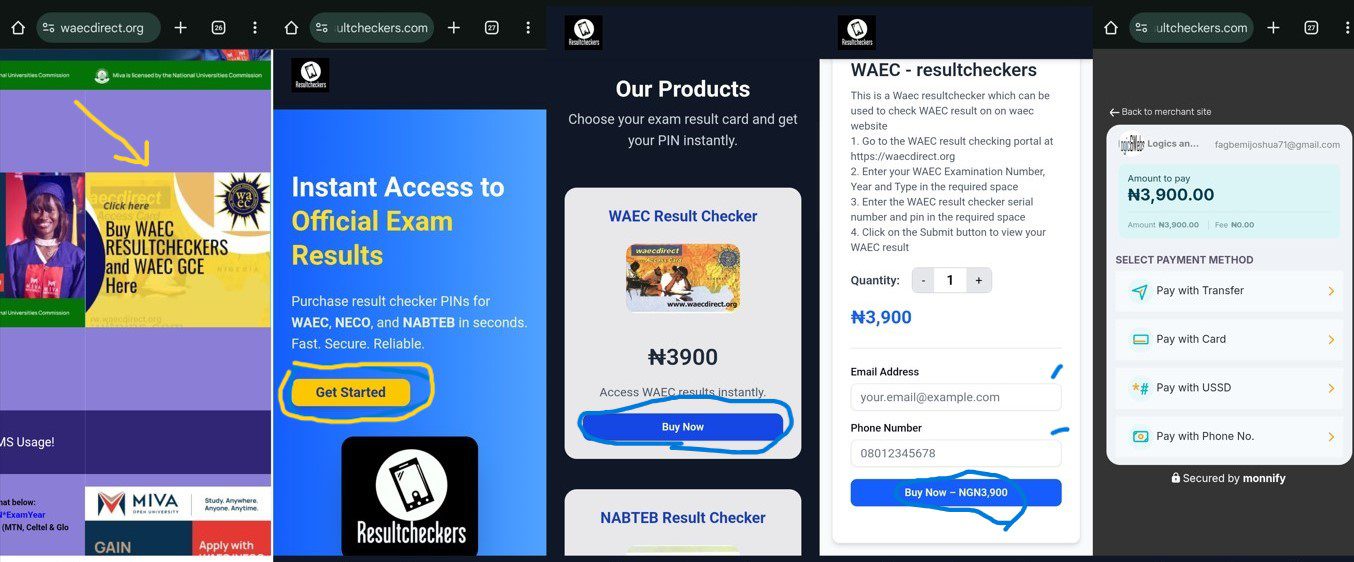
Before checking your result, you’ll need a serial number and an e-PIN. The following steps outline how to obtain the e-PIN on the WAEC website.
- Go to the result checker website on your browser.
- Click on the ‘Buy WAEC result’ section.
- Click on ‘Get Started’ on the Result Checker page.
- Choose the exam result card and ‘Buy Now’
- Supply your email address and contact information, and initiate the payment
- Select the preferred payment method and purchase your e-pin, which costs N3,600.
Note: An e-PIN voucher or scratch card purchased in a previous year remains valid for use the following year. You can check your result up to five times using the same scratch card, but only with the same candidate number.
However, each scratch card can only be used to check one result. To check a different result, you will need a new scratch card.
How to check your result
To check your result, there are three methods such as the browser, mobile application and SMS.
1. Browser
- From the result checker website on your browser.
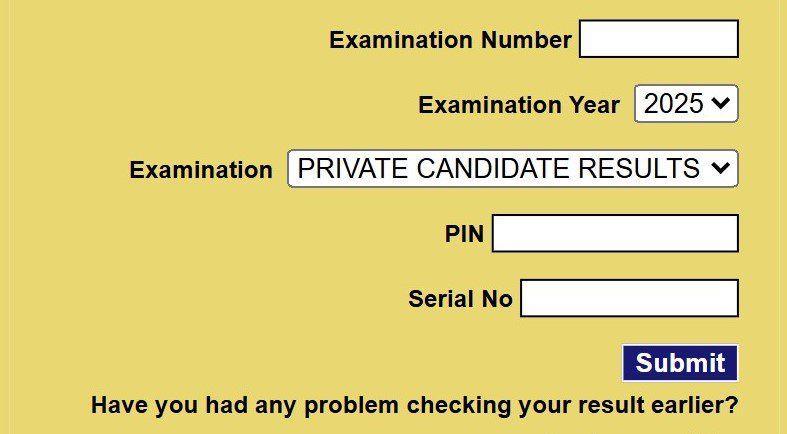
- Navigate to the left side of the page to fill in your examination details.
- Enter your 10-digit WAEC Examination Number. (This is your 7-digit centre number followed by your 3-digit candidate number, eg, 4123456789).
- Select your examination year: 2025.
- Select the Type of Examination: School Candidate Results.
- Enter the Personal Identification Number (PIN) and Serial Number on your e-PIN
- Click Submit and wait for the results window to come up.
2. Checking via the WAEC Mobile App
Aside from checking your result via the browser, candidates can also use the mobile app. To use this method, follow the steps below.
- Download and install the WAEC Result Checker app from the Google Play Store.
- Follow the prompts to enter your exam number, year, PIN and Serial Number.
- View and download your result straight from the app.
3. SMS Method (MTN, Glo, Airtel only)
Here is another method for candidates who wish to check their results via SMS. Please note that the service is only available to MTN, Airtel, and Globacom subscribers.
- Open your SMS app.
- Ensure you have at least N30 airtime on your mobile device
- Type: WAEC*ExamNumber*PIN*2025 (no spaces), For instance, WAEC*4250101234*123456789012*20245
- Send it to 32327.
- You’ll receive your result in a reply message.
For candidates who are unable to check their results via the above methods, they can use the WAEC’s complaint section.
