





The shift to remote work has brought about a new wave of flexibility, but also requires effective apps to stay productive. When equipped with the right tools, remote workers can streamline their workflow and introduce balance in their daily activities.
In this regard, productivity apps play a vital role by offering a range of features that cater to different needs and work styles. Activities like workflow, task management, communication, and focus require optimisation.
If you are a remote worker looking to up your game with effective apps, this piece has been curated for you. Gathered from skilled remote workers from diverse fields, we will explore 10 general productivity apps that help remote workers work efficiently.

Now, let us get to it.
1. Notion
Notion is a seamless productivity app and digital workspace that allows users to organise notes, projects, tasks, and more in one place.
It offers customizable pages, databases, and templates, enabling users to tailor their workspace to their specific needs and collaborate with others on shared pages and projects, allowing for real-time editing and feedback.
Notion allows for the creation of complex workflows, databases, and custom dashboards. It’s ideal for users who need a highly customizable and powerful tool to organise information and track projects.
While Notion is free for personal use, it has paid plans for more features and users.
In an honest review by a Software developer who prefers not to be mentioned, he said:
“I'm really enjoying the app so far! My only issue is that it creates temporary files in my gallery, which I have to delete regularly. Other than that, I love how well organized it is; even the free version. Being able to create multiple folders is super helpful and makes it easy to find what I need. It's visually appealing too: I'm glad I can change the color of different notes and I think having the emoji is a cute add on.”
While Notion and Google Tasks might seem the same, it is important to know that they serve different purposes and cater to different user needs.
Notion is a versatile, customizable platform for organising information, creating knowledge bases, and managing projects, while Google Tasks is a simpler, task-oriented tool designed for quick task management and integration with other Google Workspace apps.

Beyond task management, it can be used for note-taking, knowledge management, project management, and more.
While not as tightly integrated with the Google Workspace ecosystem as Google Tasks, Notion can be integrated with other apps via third-party tools. Google Tasks is designed for quick and easy task management within the Google Workspace ecosystem. It integrates well with Gmail, Calendar, Docs, and others.
2. Poe
Since the explosive launch of OpenAI’s ChatGPT, big tech companies and small startups have been rolling out chatbots for various activities. With so many out there, it can be difficult to find a chatbot that best suits your needs.
That’s where the AI chatbot aggregator Poe comes in.
Poe offers access to various AI chatbots, including those from OpenAI and Anthropic. It allows users to interact with different AI models, making it easy to explore and find the right assistant for their specific needs.
Poe gives you access to the best AI, all in one place, including GPT-4.5, Claude 3.7 Sonnet, Gemini, DeepSeek-R1, Runway, ElevenLabs, and others.
Being a one-stop shop for interacting with AI chatbots, it can also make it easy to create your own custom Chatbot (even if you have no coding experience). When you provide Poe with a prompt or instruction, it will use machine learning (ML) to bring your chatbot to life.

When you create a bot on Poe AI, you have complete control over its personality and abilities. You can specify what kind of information it should access, how it should respond to questions, and even give it a unique name and avatar.
If you are a developer, Poe provides an API that allows you to integrate Poe’s chatbot capabilities into your applications and websites.
An Email marketer, Bolaji Toheeb, briefly explains the App’s benefits to his daily workflows.
“Poe is an app that is really important to me not only in business but also in my personal dealings. As humans sometimes we think faster than what we write or do. And most of the time, our random thoughts are not always structured. Poe is an AI that comes to my rescue whenever I'm meeting a deadline. It helps me gather and structure my random thoughts. So I spend less time deliberating on one idea.”
The easy way to access Poe is through its website or a mobile app for iOS and Android devices.
While Poe is free in its basic form, it has a paid feature. With the free model, you’re limited to 100 interactions with Poe’s chatbots per day on the free version.
3. Loom
Loom is a video messaging and screen recording tool that allows users to record their screen, camera, or both, and share the recorded video instantly with a link.
It’s a platform for asynchronous video communication, enabling users to create and share videos for various purposes like explaining ideas, providing feedback, or creating tutorials. Loom is deployed to provide feedback on work, projects, and ideas.
For businesses, it can be used to personalise pitches and engage with potential customers.
The app is used by remote workers/teams seeking to streamline communication and save time on meetings, as the platform significantly reduces the need for lengthy meetings by allowing users to quickly record and share messages via video.

In other essential features, users can record their screen, webcam, or both simultaneously with a platform to host and manage recorded videos. It provides means to trim, stitch, and edit recorded videos, automatically transcribe videos, and create closed captions.
Loom integrates with platforms like Slack and Google Workspace.
4. Slack
Slack is a cloud-based team communication platform that primarily offers a business-to-business service, with its user base being predominantly team-based businesses, while its functionalities are focused primarily on business administration and communication.
The platform offers many Internet-related chat (IRC) style features, including persistent chat rooms known as channels, which are organised by topic, as well as private groups and direct-messaging functionalities.
All content, including files, conversations, and people, is searchable within Slack. As users can express their reactions in emojis to any message, message history on Slack is limited to messages from the last 90 days on the free plan.

In a description by Olalekan Rasaq, a professional data analyst with 5 years+ experience, he painted Slack as a go-to platform for minds with networks of similar interest.
“Slack is created for people in tech to connect with each other and discuss on projects. These apps serve as channels of communication between people working on the same project or offering a particular course.”
Slack allows communities, groups, or teams to join a “workspace” via a specific URL or invitation sent by a team admin or owner. A workspace can have public and private channels, with public channels and both can be converted interchangeably.
While Slack is often used by organisations with team members in diverse locations, the platform has been criticised for its poor search feature.
Circle and Discord also offer similar platforms for group/business-focused conversations as Slack. While making a distinction between Circle and Slack, Rasaq described Circle as a version of Slack/Discord that’s specifically designed for ALX students and alumni.
5. Unsplash
Unsplash is a community of photographers who provide their high-resolution photos to the world for free. The website hosts over 850,000 photos, each curated by the Pexels team to make sure only the best are released each day.
For remote workers in various fields, the app offers a go-to platform for HD pictures with filtered search features that streamline results.
You can think of it as Google for pictures. You can refine your search with the suggestions at the top of the search results page. It also suggested search topics make it easy to find the right image, even when you use a very general search term.
You can also click on the image to get more information about it, and clicking the image also shows you related images that are from the same location or are visually similar.

All images on the platform are gifted to the public by the community of photographers, which makes it legal to use them for marketing or creative purposes.
For Okiki Akinola, a digital marketer, Unsplash’s offerings of videos and illustrations make it a well-suited tool for his task execution.
“Unsplash is a great choice for me because not only can you get high definition pictures for free, but it also has free videos and illustrations that can be easily used and edited.”
6. Grammarly
Grammarly is an English language writing assistant software tool that reviews the spelling, grammar, and tone of a piece of writing as well as identifies possible instances of plagiarism.
It suggests style and tonal recommendations to users and produces writing from prompts with its generative AI capabilities. It also offers features like real-time feedback, clarity suggestions, and idea generation.
It works across a wide range of apps and websites, including Google Docs, Slack, Outlook, and Notion.

The assistant writing tool is available as a standalone application, a browser extension for Chrome, Safari, and Firefox and as an add-on for Google Docs.
Grammarly comprises free and premium versions, with the premium version offering more advanced features and personalised suggestions.
7. Upwork
Upwork is a global online platform that connects freelancers with clients, essentially acting as a digital marketplace for freelance work.
It allows professionals to find projects in various fields like writing, graphic design, web development, and marketing and also offers tools for communication, collaboration, and secure payment.
The platform provides a space where clients can post jobs and find independent contractors to fulfil them. Freelancers of diverse fields can browse job postings, submit proposals, and connect with potential clients.

Upwork also offers a “Project Catalogue” where freelancers can showcase their pre-packaged services, allowing clients to easily find and purchase them. The marketplace platform provides hybrid workforce management tools for clients to collaborate and manage projects.
In his short description of the platform, Olalekan Rasaq said:
“Upwork Talent is an app specifically created for both client and freelancers to connect on jobs. It provides an avenue for tech professionals to freelance their skill by providing services to clients who need such services.”
Also, Upwork’s global presence allows freelancers to find clients worldwide and vice versa, making it a tool for businesses and individuals to find and engage with each other to get work done, whether it’s a one-time project or a long-term collaboration.
Freelancers on Upwork provide one of more than 100 available specialisations in diverse fields, with stern competition to win jobs on the platform using Connects to submit proposals.
8. Meta Business Suite
Meta Business Suite is a platform that lets businesses and individuals manage their Facebook and Instagram accounts from a single place. It’s simply a centralised hub for content creation, scheduling, ad management, and customer communication, offering tools to help businesses connect with their audiences and optimise their online presence.
The platform is a free tool that consolidates your social network activities in one place, connecting your social accounts to third-party tools.
It makes it easy to view notifications and respond to messages quickly. You can also create or schedule posts, stories, and you will find helpful insights to optimise your efforts as you navigate through the app.

The App’s home screen shows you an overview of your to-do list, recently published and scheduled content, and resources to help you grow your audience and make use of Meta’s advertising tools and new features in Meta Business Suite.
For business owners, it presents details about your business’s performance, such as trends, activity on the content share, and more information about your audience. These insights can surely help you make informed decisions about your content and advertising strategies to help you grow your business.
9. ProofHub
If you’re looking to track the duration spent on your tasks, ProofHub is the platform that monitors your project management. ProofHub is an all-in-one project management and collaboration platform designed to help teams plan, organise, and execute projects.
It provides tools for task management, file sharing, time tracking, project planning, and reporting. ProofHub aims to streamline workflow and improve productivity by centralising project-related activities in one location.
ProofHub allows you to accurately track how much time you spend on your tasks, either manually or using timers. You can also add timesheets, set time estimates, create time reports, and monitor project progress as it moves through various stages of development.
For firms, it presents the ability to assign tasks to a particular team member based on their skill level.
Users can upload relevant project documents on the platform and share them with others for easy collaboration. The App also has a feature that lets teammates see the tasks they are supposed to start first and which tasks are dependent on the completion of others.

A review by a product manager, who prefers anonymity, explained that the mobile app often poses difficulties with frequent bugs while the use on the web presents a nice experience.
“Great app for productivity on the desktop, but mobile has a few major bugs that limit the user experience. For instance, if clicking into a task list on the overview page of any project, it will show a blank page. The user must go to tasks, not overview to dive in deeper into individual task lists. This has been an occurring problem.”
10. Buffer
Buffer is another productivity app that helps with adequate social media management. The app allows users to schedule posts, preview them, and analyse their performance on various social media platforms.
It is designed for small businesses and individuals to streamline their social media efforts by offering tools for planning, scheduling, and publishing content across multiple channels.
The platform provides detailed analytics for every update shared, helping you track your social media performance and identify what resonates with your audience. You can collaborate on content creation and scheduling with other team members or project mates, making it easy for teams to manage social media across different platforms.
In addition, Buffer supports various social media networks like Instagram, Facebook, Threads, TikTok, Pinterest, LinkedIn, YouTube, and more, and offers an AI assistant that can generate content ideas, repurpose posts, and rewrite copy.
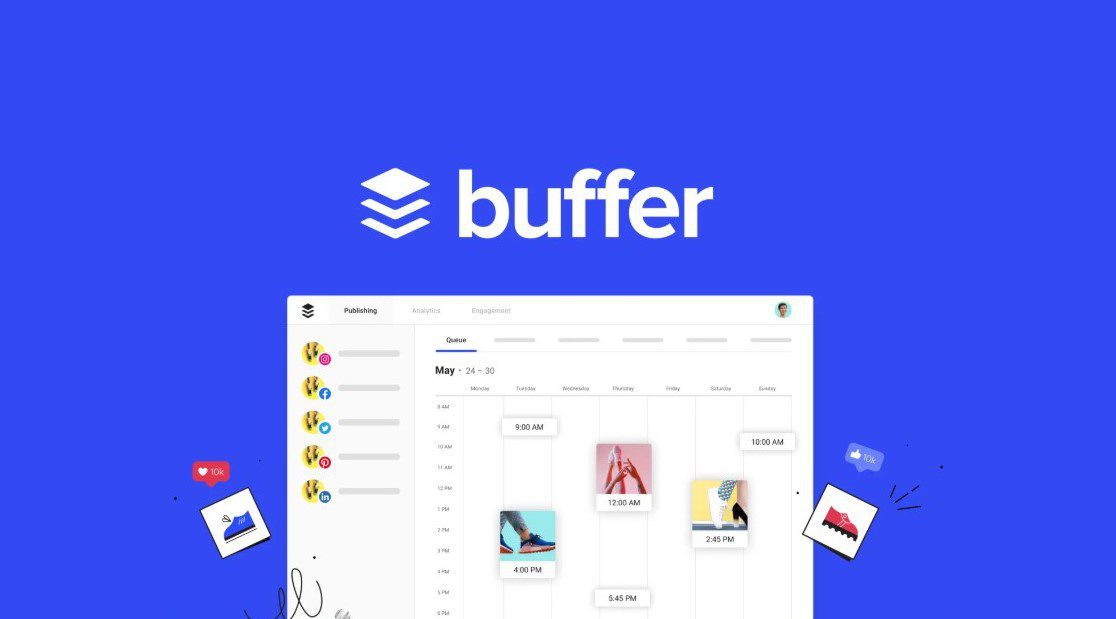
On the pricing plan, Buffer has a free plan for managing up to three social channels with limited posts per month. Paid plans start at $5 per month per channel, scaling up to $120 per month.
In conclusion
Using these apps can boost your productivity rate, while constraints such as freedom to choose when you work and procrastination can reduce the functionality and work rate.
Just to note, these apps do not boost productivity in isolation. They depend on the user for an optimised effect.
